¿Listo para implementarlo en tu Odoo?
Agenda una demo o habla con un consultor y resuelve tus dudas antes de comprar. Instalación, configuración y soporte incluidos.

MI ERP BIM — Odoo 19
Real Open BIM core, integrated under MI ERP Construction
Description
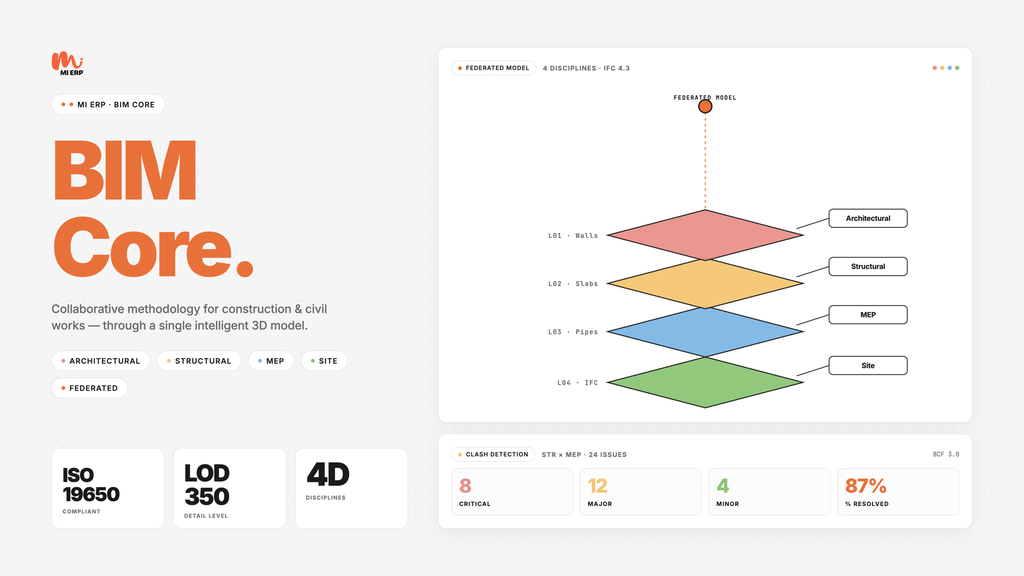
MI ERP BIM is the real, internationally pure Building Information Modeling core for Odoo 19, rendered as a section under the MI ERP Construction application. It covers the full Open BIM lifecycle: IFC import via IfcOpenShell, in-form 3D viewing with xeokit-sdk, BCF 2.1 issue tracking with viewpoints and round-trip, geometric clash detection between disciplinary models, and full ISO 19650 compliance (roles, classifications, LOIN levels, EIR / BEP, CDE workflow).
Every IFC element is parsed and stored as an Odoo record with its
GUID, property sets and quantities — so they can be linked back to
the APU concepts in mierp_construction
for automatic 5D measurement traceability. Models are streamed to
the browser as XKT through bearer-authenticated REST
endpoints, so the viewer works behind any reverse proxy without CDN
dependencies.
l10n_<country>_mierp_bim modules.
Product screenshots
Real screenshots from the module running on Odoo 19 with seeded IFC fixtures (Architecture, Structural and HVAC), captured by the Playwright audit suite.

In-form xeokit 3D viewer — OTC Conference Center (6,556 elements)
Solibri-style light theme with MI ERP orange accents. The viewer
automatically detects Y-up vs Z-up models, frames the AABB on load,
and ships Fit / Top / Iso / Clear camera presets.
XKT streams from /api/v1/mierp/bim/model/<id>/xkt
through bearer auth, so it works offline-friendly behind any reverse
proxy. Click any element to surface its property sets and quantities
in the side panel.

BIM Projects
One BIM project per construction work — auto-linked to the parent mierp.construction.work record so quantities flow back into the budget.

Federated models
Versioned IFC models per discipline (Architecture, Structural, HVAC…) with SHA-256 hash, parsed elements count and CDE state.

Residential model — Schependomlaan (3,510 elements)
Reference IFC4 residential building: brick walls, mansard roof, bay windows. Camera framed automatically with the model's AABB and Z-up auto-detection.

Structural model
Federated structural IFC: columns, beams and slabs rendered side-by-side with the architectural model for clash detection.

HVAC model
MEP/HVAC ductwork with IfcDuctSegment, IfcAirTerminal, etc. Also exposed as picking targets for issue creation.

BCF 2.1 Issues
BCF round-trip import / export. Issues kanban with status, priority, assigned reviewer and the originating BIM viewpoint.

Element property sets & quantities
Every IFC element is a first-class Odoo record with GUID, type, storey, material, all Pset_* properties and BaseQuantities.

BIM model form — IFC ingest + XKT + viewer in one tab
One form per IFC model: project link, discipline, version, SHA-256 hash, IFC schema, parsed elements count, CDE state, generated XKT and the embedded 3D viewer all in the same page.

BIM Execution Plan
ISO 19650 BEP / EIR records with sections, deliverables and assigned roles. WeasyPrint renders a branded PDF for kickoff sign-off.

Disciplines
Universal taxonomy: Architecture, Structure, HVAC, Plumbing, Electrical… Used to federate models and drive the clash matrix.

ISO 19650 roles
Pre-loaded ISO 19650 roles (Information Manager, Lead Appointed Party, Task Information Manager…) attachable to projects and BEP records.

BIM under Construction
Not a separate app: BIM lives as a submenu under mierp_construction so estimators and BIM coordinators share one workspace.
Core features
IFC import (IfcOpenShell)
- IFC2x3, IFC4 and IFC4X3 supported
- Background parsing via OCA queue_job (sync fallback)
- SHA-256 hashed, versioned model files
- Property sets & base quantities extracted per element
In-form xeokit 3D viewer
- OWL 2 field widget — drop into any form
- XKT streamed via bearer-authenticated REST
- Solibri-style light theme + MI ERP accents
- Element picking Pset / quantity panel
BCF 2.1 round-trip
- BCF 2.1 import / export
- Viewpoints with camera state and snapshots
- Comments, statuses and priorities
- Kanban board for triage
Geometric clash detection
- Disciplinary mesh intersection via trimesh
- Clash matrix per project, per discipline pair
- One-click BCF issue with viewpoint
- Tolerance and group-by-storey controls
ISO 19650 compliance
- Pre-loaded ISO 19650 roles & classifications
- LOIN levels (Level Of Information Need)
- EIR / BEP records with WeasyPrint PDF
- CDE workflow: WIP Shared Published Archived
Construction integration
- BIM project mierp.construction.work
- Quantities APU concepts via classification
- Lives under the Construction app menu
- Single permission tree (BIM User / Coordinator / Manager)
REST & integrations
- Bearer-authenticated XKT streaming endpoint
- JSON-RPC /api/v1/mierp/bim/element/by_guid
- Classification & pset lookup endpoints
- Reusable from mobile / external dashboards
Internationally pure
- No country-specific data in the core
- Spanish / Colombian / Venezuelan packs as siblings
- i18n: en, es, es_CO, es_VE
- Multi-company, multi-currency aware
Localizations (auto-install)
The BIM core is country-neutral. Country-specific classifications, BEP templates and regulatory checklists ship as auto-installable sibling modules.
Colombia
l10n_co_mierp_bim
- CONPES 4144 BIM strategy
- EIR template — public works
- Catastro / IGAC classification
Spain
l10n_es_mierp_bim
- UNE-EN-ISO 19650-2 templates
- FIEBDC-3 IFC mapping helpers
- Public works EIR boilerplate
Venezuela
l10n_ve_mierp_bim
- SENIAT-aware fiscal codes
- COVENIN classification stubs
- Spanish (es_VE) translations
Typical workflow
Project kickoff
- Open the construction work and create its BIM project from the stat button.
- Define disciplines, ISO 19650 roles and the LOIN per deliverable.
- Import the EIR / BEP and render the PDF for the appointing party.
Federation & review
- Upload IFC files per discipline — IfcOpenShell parses them in the background.
- Open any model in the in-form xeokit viewer; click elements for Pset / quantity details.
- Run clash detection between disciplinary pairs; promote clashes to BCF issues.
- Round-trip BCF with reviewers (Solibri, BIMcollab, Trimble Connect…).
Construction handoff
- Map element classifications to APU concepts in mierp_construction.
- BIM quantities flow into 2D measurements for the budget.
- Move models through the CDE: WIP Shared Published Archived.
Technical details
- Main models: mierp.bim.project, model, element, pset, quantity, issue, clash, bep, eir, discipline, role, loin, classification.
- Viewer: OWL 2 field widget (widget="bim_viewer") with vendored xeokit-sdk 2.6.108 ESM bundle under static/lib/xeokit/.
- IFC XKT conversion via the xeokit-convert Node CLI; backend caches the XKT and serves it through a bearer-authenticated controller.
- JSON-RPC endpoints under /api/v1/mierp/bim/* for elements, models, classifications and BCF round-trip.
- BEP PDF rendered with WeasyPrint and MI ERP branding.
- Test suite: 20 Odoo unit tests + 19 Playwright E2E tests, 72 % coverage.
- Compatible with Odoo Enterprise and Community.
- Depends on: base, mail, project, mierp_construction.
Requirements
Odoo modules
- Discuss (mail)
- Project (project)
- MI ERP Construction (mierp_construction)
Python dependencies
- ifcopenshell — IFC parsing
- trimesh + numpy — clash detection
- lxml — BCF round-trip
- weasyprint — BEP PDF
Optional tooling
- xeokit-convert CLI (Node 20+) for IFC XKT
- OCA queue_job for async parsing


Contact us
You'll get free assistance for 60 days for any issue or error.
For inquiries or support: [email protected]
Pricing
- Email support
- Updates included
- Multi-company, multi-currency
Need the full suite?
MI ERP BIM Suite bundles the 5 core modules (Construction, BIM, Revit, 4D/5D, FM) plus the 2 Colombia localizations.
Get in touch for a tailored quote — we’ll scope partner discounts and rollout support to your organisation.
Available as a standalone module: mierp_bim_suite.