¿Listo para implementarlo en tu Odoo?
Agenda una demo o habla con un consultor y resuelve tus dudas antes de comprar. Instalación, configuración y soporte incluidos.

Venezuela: POS Mercantil C2P y Vuelto Digital — Odoo 20
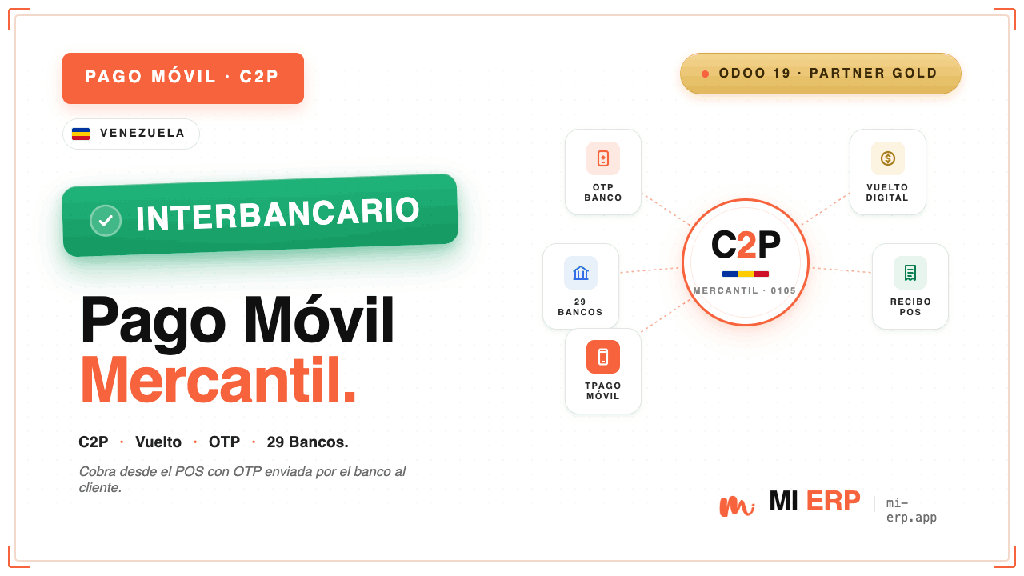
Pago Móvil C2P y Vuelto Digital del Banco Mercantil integrados al Punto de Venta
Descripción
El módulo POS Mercantil C2P para Odoo 20 conecta el Punto de Venta directamente con el API Tpago C2P y Vuelto Digital del Banco Mercantil de Venezuela, permitiendo cobrar al cliente vía Pago Móvil interbancario y devolver el vuelto digital sin salir del POS.
El cajero captura los datos del cliente (cédula, banco, teléfono y OTP) en un popup OWL nativo de 5 pasos.
Las llamadas al banco viajan a través de un controlador backend de Odoo que aplica el
cifrado obligatorio AES/ECB/PKCS5Padding con clave derivada de SHA-256 sobre los campos
sensibles (cédula, teléfonos, OTP) antes de enviarlos al endpoint
apimbu.mercantilbanco.com.
pos.payment y pos.order.
X-IBM-Client-Id como header de autenticación.
Funcionalidades por bloque
Cobro C2P (Compra)
- Cobro al cliente vía Pago Móvil interbancario
- Captura de teléfono, banco y cédula del pagador
- OTP solicitado al banco emisor (Tpago para Mercantil)
- Persistencia de referencia y trace en
pos.payment - Manejo de 17 códigos de error oficiales en español
Vuelto Digital (P2P)
- Cálculo automático del vuelto al recibir más del cobrado
- Envío vía Pago Móvil al teléfono del cliente
- Receptor pre-cargado con datos del paso 1
- Editable si el receptor es distinto al pagador
- Referencia separada del cobro para conciliación
29 Bancos Venezolanos
- Lista oficial completa del sistema Pago Móvil
- BDV, Mercantil, Provincial, Banesco, BNC, Tesoro…
- Selector con código + nombre del banco
- Instrucciones OTP específicas por banco
- SMS / app del banco / Tpago según el emisor
Cifrado y Seguridad
- AES/ECB/PKCS5Padding con SHA-256 (16 bytes)
- Cifrado siempre en backend, nunca en JS
- Secret Key restringido a
base.group_system - Logs sin datos sensibles (cédula, OTP, teléfono)
- TLS estricto (
verify=True) hacia el banco
Certificación & Producción
- Endpoint de certificación configurable por método
- Endpoint de producción precargado
- Botón 🔌 Probar Conexión con verificación SSL
- Cambio modo sin reinicio del servidor
- Timeout configurable (default 30 s)
Popup OWL2 — 5 pasos
- Indicador visual de avance del flujo
- Validación de teléfono (11 dígitos, formato 04XX)
- Validación de cédula/RIF (V/E/J + número)
- Pre-carga de datos del partner del ticket
- Reintentos guiados desde la pantalla de error
Interfaz y experiencia de usuario
El cajero ve el método de pago "Pago Móvil C2P (Mercantil)" en la pantalla de pago del POS. Al seleccionarlo se abre un popup de 5 pasos guiados que precarga los datos del cliente cuando hay un partner asignado al ticket. Una vez confirmado el cobro, el indicador de procesamiento se mantiene hasta que el banco responde, y todas las referencias quedan asociadas al pago para conciliación posterior.
Configuración del método de pago

Flujo completo en el POS


Flujo de Trabajo
Configuración inicial
- Regístrese en apiportal.mercantilbanco.com y suscriba el plan "Botón de Pagos Móviles (C2P) y Vuelto".
- Al recibir el correo de Mercantil con
X-IBM-Client-Id,Secret Key,MerchantIdy endpoint de certificación, vaya a Punto de Venta → Configuración → Métodos de Pago. - Edite el método "Pago Móvil C2P (Mercantil)" y cargue las credenciales en la pestaña Mercantil C2P.
- Seleccione el modo Certificación para pruebas y verifique conectividad con el botón 🔌 Probar Conexión.
- Asocie el método de pago al POS desde la configuración de la tienda.
Cobro C2P en el POS
- El cajero arma el ticket y selecciona "Pago Móvil C2P (Mercantil)" en la pantalla de pago.
- El popup captura teléfono, banco emisor y cédula/RIF del cliente (paso 1).
- Al solicitar el OTP, el sistema decide si lo envía vía Tpago (clientes Mercantil) o muestra instrucciones específicas (otros bancos).
- El cliente entrega el OTP al cajero, quien lo introduce y confirma el cobro (paso 2).
- El backend cifra los datos sensibles, llama al API Mercantil y muestra la respuesta (paso 3).
Entrega de vuelto digital
- Si el cliente pagó más del monto cobrado, el popup calcula el vuelto y ofrece enviarlo vía Pago Móvil.
- El receptor se pre-carga con los datos del cliente; el cajero puede cambiarlos si el destino es diferente.
- Al confirmar, el banco genera la transacción P2P y devuelve la referencia del vuelto.
- La pantalla final muestra ambas referencias (cobro + vuelto) para imprimir o entregar al cliente.
Detalles Técnicos
- Hereda
pos.payment.method,pos.paymentypos.order. - Implementa una
PaymentInterfacepersonalizada (PaymentMercantilC2P) en el POS, con popup OWL2 nativo de 5 pasos. - Endpoint oficial:
POST https://apimbu.mercantilbanco.com/mercantil-banco/prod/v1/payment/c2p. - Cifrado obligatorio AES/ECB/PKCS5Padding con clave derivada de SHA-256 (primeros 16 bytes) sobre los campos sensibles, codificación Base64/UTF-8.
- Header de autenticación
X-IBM-Client-Idy JSON conmerchant_identify,client_identifyytransaction_c2p. - Endpoints internos JSON-RPC:
/web/pos/mercantil/c2p/{pay,vuelto,request_otp,banks,search}. - Compatible con Odoo Enterprise y Community Edition.
- Depende de:
point_of_sale,base_setupy el paquete Pythonpycryptodome.
Secret Key debe permanecer secreto. El módulo lo restringe al
grupo base.group_system y nunca se imprime en logs. Si sospecha exposición, solicite a Mercantil
rotar la clave inmediatamente.
Bancos venezolanos soportados
El módulo soporta los 29 bancos venezolanos afiliados al sistema Pago Móvil interbancario: Banco de Venezuela (BDV), Venezolano de Crédito (BVC), Banco Mercantil, Banco Provincial (BBVA), Bancaribe, Banco Exterior, BOD, Banco Caroní, Banesco, Sofitasa, Banco Plaza, Bancorp, BFC Banco Fondo Común, 100% Banco, DelSur, Banco del Tesoro, BAV, Bancrecer, Mi Banco, Activo, Bancamiga, BANID, Banplus, Bicentenario, Nuevo Mundo, Banatlantico, BNC e INSOFIN.
Requisitos
Módulos Odoo
- Punto de Venta (point_of_sale)
- Configuración Inicial (base_setup)
Paquete Python
pycryptodome(cifrado AES)
Configuración previa
- Cuenta jurídica en Banco Mercantil
- Afiliación al servicio C2P (genera el
merchantId) - Registro como desarrollador en el portal API Mercantil
- Plan "Botón de Pagos Móviles (C2P) y Vuelto" activado
- Certificado SSL válido en el servidor Odoo


Contáctanos
Obtendrás asistencia gratuita durante 60 días por cualquier error o problema.
Para consultas o soporte: [email protected]